React 컴포넌트 타입 지정하기
리액트 컴포넌트의 타입은 React.FC로 지정한다.
import React from "react";

export const TextField: React.FC = () => {
  return (
    <div>
      <input />
    </div>
  );
};
Prop 사용하기
props를 받을 때는 React.FC<{prop이름: prop타입}>을 이용한다.
import React from "react";

export const TextField: React.FC<{ text: string }> = () => {
  return (
    <div>
      <input />
    </div>
  );
};
혹은 props용 interface를 이용하여 제네릭에 넣어준다.
import React from "react";

interface Props {
  text: string;
}

export const TextField: React.FC<Props> = () => {
  return (
    <div>
      <input />
    </div>
  );
};
interface Person {
firstName: string;
lastName: string;
}
interface Props {
text: string;
ok: boolean;
i: number;
fn: (bob: string) => void;
person: Person;
}prop이 optional한 경우에는 ?를 붙인다.
interface Props {
  text: string;
  ok?: boolean;
  i?: number;
  fn?: (bob: string) => void;
  person: Person;
}
Hooks 사용하기
1. useState
유형 추론
기본적으로 유형 추론을 지원한다.
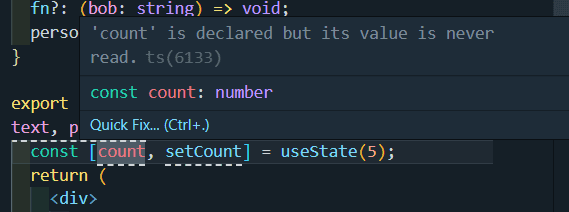
유형 지정하기
유형을 명시적으로 지정하려면 <>를 사용하여 지정한다.
const [count, setCount] = useState<number | null>(5);

setCount(null);
const [count, setCount] = useState<{ text: string }>({ text: "hello" });
setCount({ text });interface TextNode {
text: string;
}
const [count, setCount] = useState<TextNode>({ text: "hello" });2. useRef
기본적인 형태는
const ref = useRef<반환값>(초기값);위와 같다.
DOM 요소에 대한 참조하려면 엘리먼트에 맞는 HTML***Element로 타입을 명시한다.
const inputRef = useRef<HTMLInputElement>(null);
const divRef = useRef<HTMLDivElement>(null);
초기값은 null이나 HTML 엘리먼트의 초기값으로 지정할 수 있다.
대부분 초기값은 null로 지정한다.
3. useReducer
**useReducer**훅이 반환하는 값의 타입을 지정해야한다.
그러기 위해 액션 타입과 상태 타입을 정의해야 한다.
- 액션 타입:
type속성의 타입 (action 파라미터에 넘어가는 타입) - 상태 타입: 리듀서 함수에서 반환하는 상태의 타입
import { useReducer } from "react";

type Action = { type: "increment" } | { type: "decrement" };
type State = { count: number };

function reducer(state: State, action: Action) {
  switch (action.type) {
    case "increment":
      return { count: state.count + 1 };
    case "decrement":
      return { count: state.count - 1 };
    default:
      throw new Error();
  }
}

function MyComponent() {
  const [state, dispatch] = useReducer(reducer, { count: 0 });

  return (
    <div>
      <p>Count: {state.count}</p>
      <button onClick={() => dispatch({ type: "increment" })}>Increment</button>
      <button onClick={() => dispatch({ type: "decrement" })}>Decrement</button>
    </div>
  );
}